
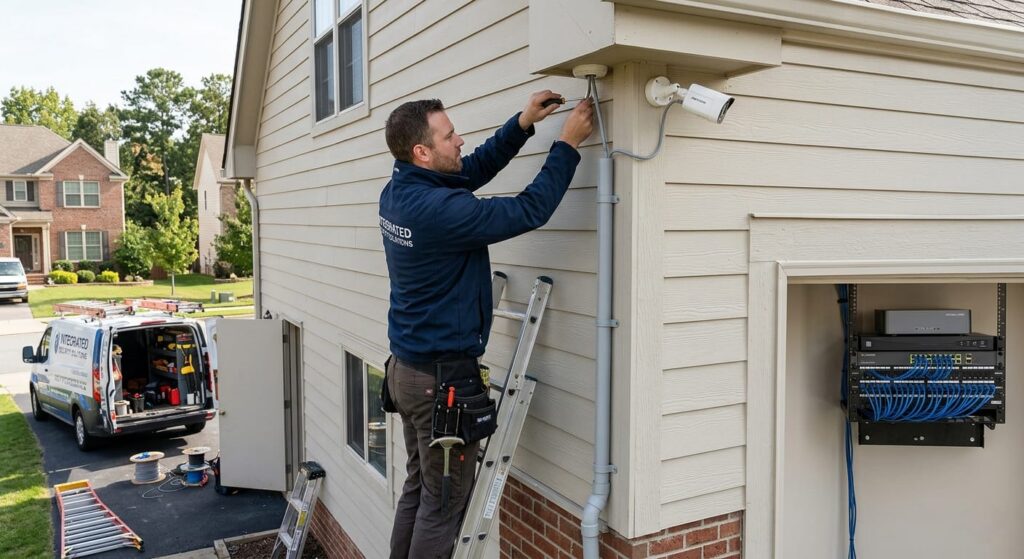
Understand how professionals design surveillance systems using wired, wireless, solar, and cellular setups for real-world home protection. Read our Comprehensive Setup Guide
When someone like John moves into a new house and decides to install a few cameras, what usually happens is predictable: he opens YouTube, gets flooded with terms like 4K, PoE, Wi-Fi, solar, NVR, ANPR, and within an hour he’s more confused than when he started.
From the field perspective, this is the real truth most people miss: you choose architecture before cameras. Everything else is secondary. And architecture always starts with one question:
What infrastructure do you actually have, and what are you willing to build?
1. No Infrastructure at All: Solar + Cellular Systems
There are real-world cases where there is literally nothing: no electricity, no network and no pre-existing cabling. Think remote gate, storage yard, farm edge and temporary site. In these cases, modern systems rely on cameras that combine:
- a photovoltaic (solar) panel
- an internal rechargeable battery
- a SIM card with cellular data transmission
From experience in the field, these systems work surprisingly well when installed correctly, but they are not set and forget forever, as they are trade-off systems. You gain full independence, fast installation and zero trenching or cabling, but also sacrifice absolute reliability due to wireless signal instability, as well as finite number of battery charging cycles.
And this is something many installers don’t say clearly enough: the battery is the real lifespan limiter, not the camera sensor. After hundreds of cycles, performance drops. And in most camera units, there is no way to replace just the battery, therefore the whole camera needs to be replaced.
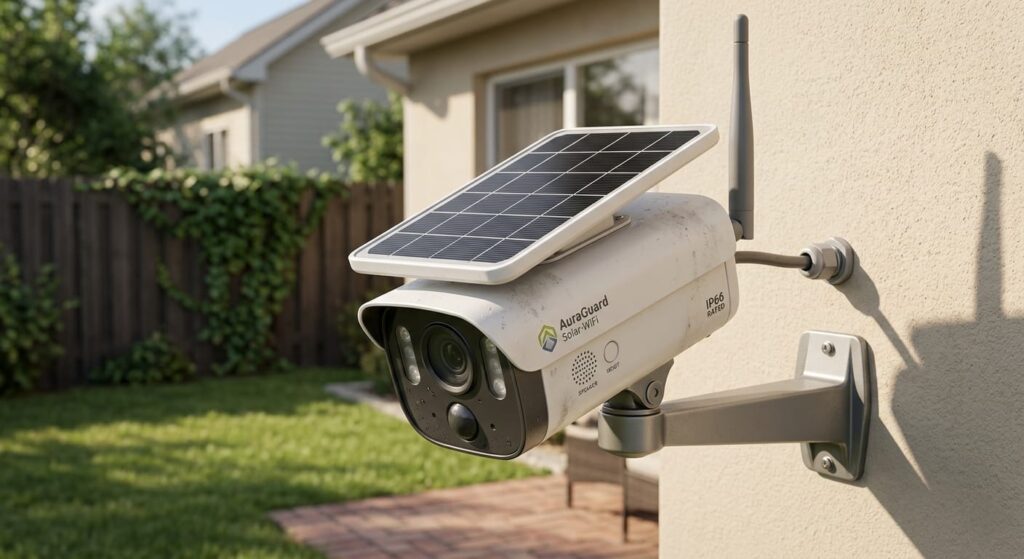
2. Solar + Wi-Fi Cameras. Almost Wired, but Not Quite
The next layer is where many residential installs sit. Here, you still avoid electrical infrastructure by using solar power, but instead of cellular data, you rely on Wi-Fi coverage.
This works well only if you understand one thing: Wi-Fi is not exactly coverage, but a quality at a specific point in space. From field experience, people massively overestimate their home Wi-Fi range. A camera might connect during setup, but fail under rain conditions, wall interference or router load at peak hours.
So this category is good, but only when the Wi-Fi design is properly engineered, not assumed.
3. Hybrid Systems. Power Available, But No Network
This is a very practical scenario that doesn’t get enough attention. You have electricity at a point, like a pole, external wall or garage, but no stable Wi-Fi infrastructure. In that case, cameras are powered normally connected to the mains electricity, so we save the need for a battery charged photoelectric carera, but we still transmit data via the cellular network.
This hybrid model is often used in perimeter poles, long driveways or detached structures. It solves a very real installation problem: power is easy but data is hard.
4. Wired Systems. The Real Backbone
When we move into serious residential or semi-professional installations, everything eventually comes back to PoE. Power over Ethernet is still, in practice, the most stable and predictable solution. Over one cable you carry the video data and supply power to the camera.
No batteries. No wireless interference. No guessing. Before PoE, coaxial analog systems were the standard. They worked, but belonged to a different era of separate power lines, limited resolution and no real analytics.
Today, there is almost no justification to install new coax infrastructure in residential environments. The intelligence, scalability, and integration value of IP systems is simply higher.
5. Reality Check: You Will Still Need Hybrid Thinking
Even if you go wired, real homes are not clean diagrams. Because you may always hit detached garages, barns or sheds, long perimeter fences and areas where trenching is expensive or impossible.
This is where good systems stop being pure and become hybrid by design.
A proper NVR can unify both:
- PoE cameras
- Wi-Fi cameras
- cellular cameras
And this is important, since the value is not the camera but the unified view.
6. Cabling: Where Most Installations Fail Silently
Most people obsess over camera specs while in the field, failures almost always come from cabling.
Here is the reality:
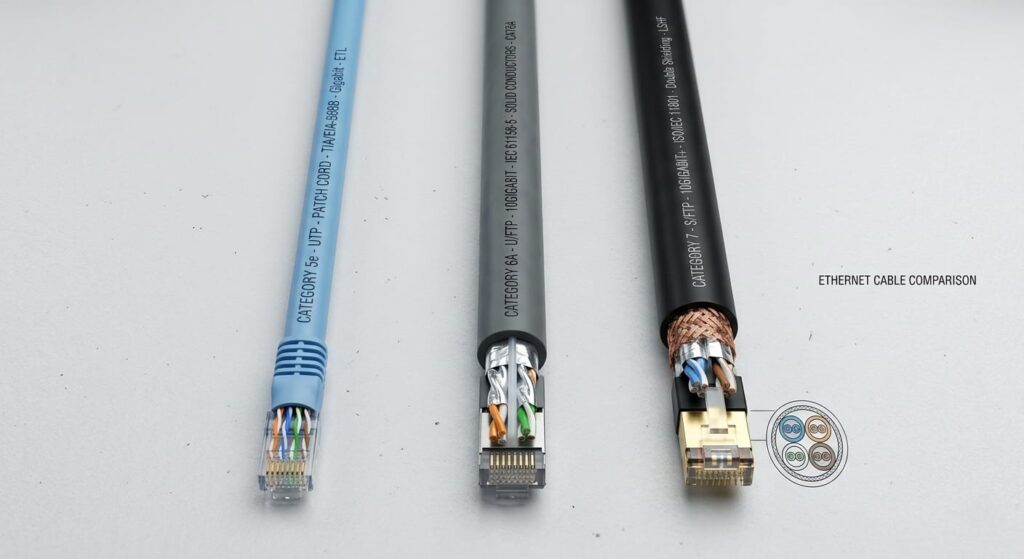
- Cat5e is enough for most camera systems
- Cat6A is the modern standard
- Cat7 is unnecessary in residential surveillance
Cat7 sounds better, but in practice it is bulkier, more expensive, harder to terminate and absolutely not required for security cameras or intercom wiring. In fact, it offers no real-world benefit for CCTV bandwidth needs.
What matters more than cable category, is the shielding quality, physical protection and correct routing.
And this is non-negotiable from experience: no exposed cable runs, ever. Everything goes through conduit. Outdoor cameras fail far more from moisture and mechanical damage than from electronics.
7. System Planning: Star Topology or Chaos
Before installing anything, you need to decide where the brain of the system sits: the NVR and network switch location, which will most probably sit next to each other.
Everything should converge to a single central point, or what we call star topology. This is not theoretical it will keep your survaillance system maintainable. And here is a rule every installer learns the hard way:
If you are unsure, pull an extra cable.
Not because you will definitely use it, but because reopening walls, conduits, or outdoor paths later is expensive, messy, and often impractical.
8. Intercoms: The Most Ignored Security Component
This is one of the biggest blind spots in residential security. Modern intercoms are not doorbells. They have cameras, microphones, speakers and access control devices. And they often get completely excluded from planning.
In real installations, you think in layers:
- gate intercom
- main entrance intercom
- garage intercom (in some homes)
Because people don’t always enter the same way. A visitor might arrive at the gate, or go directly to the front door, or even access a side/garage entrance.
Proper intercom placement defines usability, and not just security. And yes, intercoms often include keypad access. From field experience, PIN codes are the most practical solution. You can dispence an access code per user, which is extremely useful for tracking access.
NFC exists, but is often an overkill for residential setups.
9. Camera Placement: Angles Decide Everything
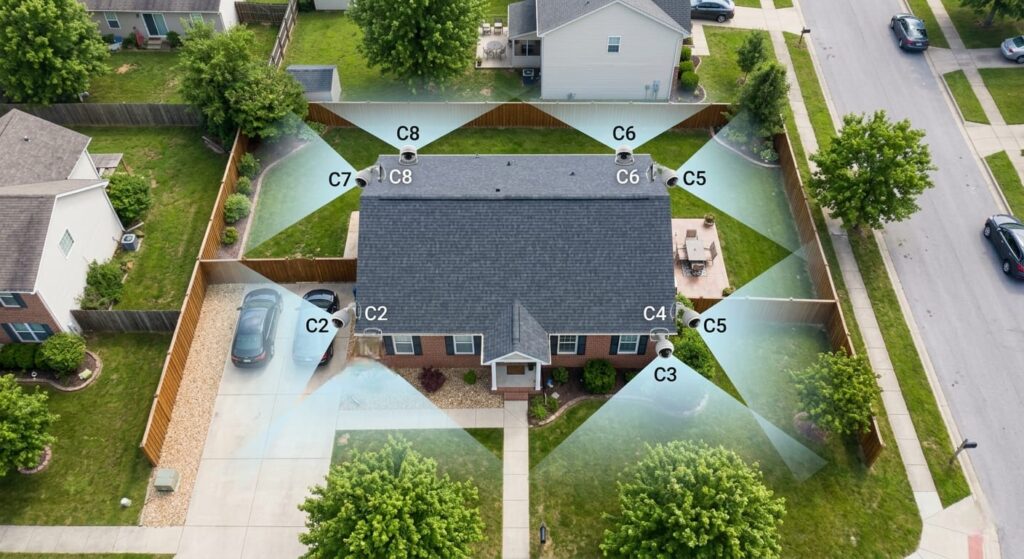
Here a thumb rule: most cameras sit between 90° and 120° field of view, and this leads to a simple field rule: corners are your best friend.
Placing a camera at a corner with a 30–45° angle allows you to “stretch” coverage efficiently. For a typical rectangular house with 4 corners × optimized angles, usually results in ~8 cameras total for full coverage
But there is a smarter alternative, because 180° panoramic cameras, with dual lens systems, reduce hardware count, but increase complexity and cost per unit.
10. The Most Important Insight: Perimeter Beats Interior
Here is something you only fully understand after seeing real incidents:
Interior cameras are secondary. Perimeter cameras are primary.
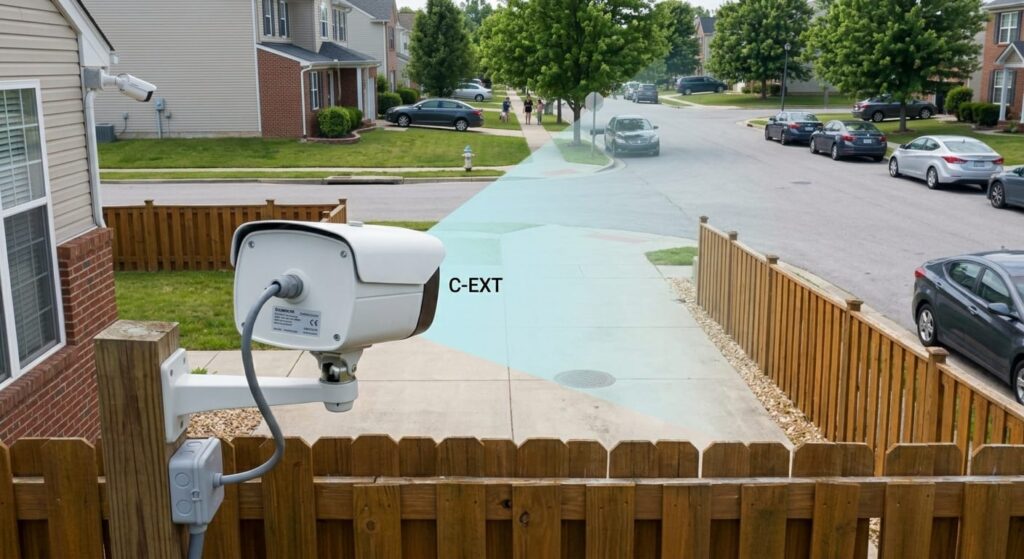
Most real-world events happen at fences, near driveways, around parked vehicles and along external boundaries. Not inside living rooms.
If your fence borders public space, the value increases significantly, since vandalism detection, graffiti events, accidental vehicle damage or unauthorized presence near property line will be spotted. And that’s gold.
And most importantly: early detection before entry. Bacause from real-world patterns, the most valuable footage is often not the break-ins, but everyday incidents people don’t expect, such as a car mirror hit by a cyclist, a slow scratch in a parking situation, someone leaving without leaving details or dropped items left outside the house.
This is why perimeter coverage is not optional in serious systems.
11. ANPR: Where Security Becomes Automation
ANPR (Automatic Number Plate Recognition) cameras are a different class of system. They allow:
- license plate recognition
- vehicle tracking
- access control decisions
This is where surveillance becomes automation. For example, your gate opens when your car approaches, an unknown vehicle triggers an immediate alert, an even blacklisted vehicles can be blocked.
This is not luxury security. In many modern systems, it is becoming a standard perimeter logic.
12. Environmental Reality: Moisture Kills Systems
One of the most underrated killers of surveillance systems is not hacking or hardware failure. It is humidity. Outdoor installations require proper sealing, proper junction boxes and correct cable termination.
PoE systems are especially sensitive because power + data run together. And a single compromised connection can bring down multiple cameras and cause a shortcut and camera burn. Read more in the following article
From field experience: most camera failures are cause due to installation failures, and not due to product failures.
13. Manufacturer Strategy: Ecosystem Matters More Than Specs
Choosing your manufacturer is not about megapixels. It is about ecosystem integration.
Three real-world categories exist: the cheap consumer cameras, mid-tier systems and professional ecosystems. In the professional category, the two brands that standout are Hikvision and Dahua, which also dominate globally.
These manufacture not only cameras, but also NVRs (recording devices), intercoms and unified apps.
But they come with a big trade-off: their setup is less intuitive, requires camera activation steps and configuration complexity that isn’t seen in cheap consumer cameras and mid-tier systems.
This is why in practice, most of Dahua and Hikvision installations are performed by proffesional installers.
Installation quality matters more than product quality
A perfectly installed mid-tier system beats a poorly configured professional system every time.
14. Recording Strategy
Recording storage is one of the most overlooked but critical parts of any home surveillance system. Entry-level systems often rely on cloud storage, where video footage is uploaded and stored on a service provider’s servers, typically in exchange for a recurring monthly subscription fee. This model is convenient because it requires almost no local hardware management, but it also creates a long-term dependency on ongoing payments and internet stability.
A second common option is local storage via SD or microSD cards inserted directly into the camera. While this seems simple and cost-effective, it comes with two major real-world risks seen repeatedly in field installations:
- Memory cards can (and eventually will) silently fail or become corrupted, and the user often discovers this only when trying to retrieve critical footage, finding that nothing was recorded.
- The camera itself can be physically damaged or stolen, and if that happens, the storage disappears along with it, taking the only copy of the recording.
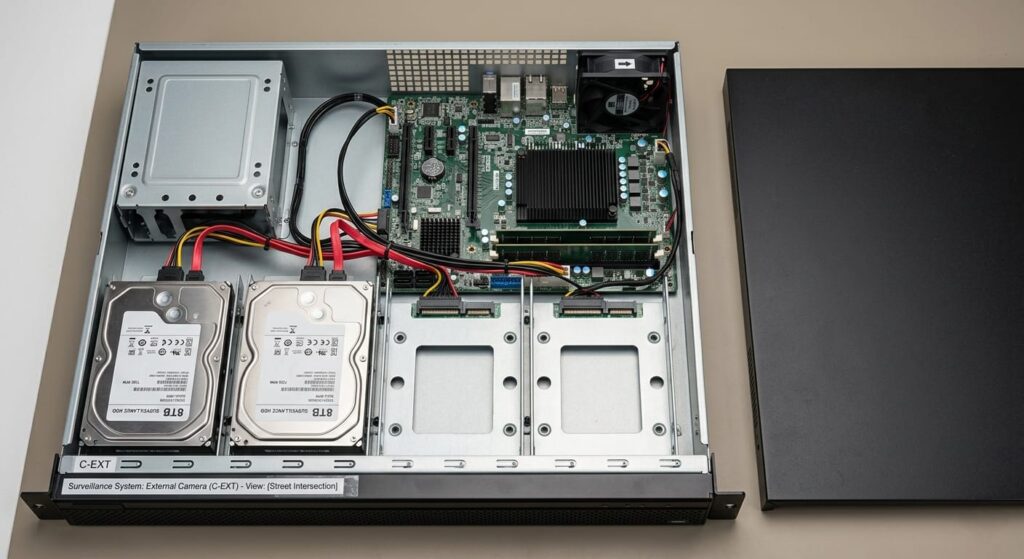
For this reason, the most reliable professional recommendation is a dedicated NVR (Network Video Recorder) system with local recording onto high-capacity hard drives. Unlike edge storage, an NVR centralizes recording in a controlled location and allows continuous or scheduled recording depending on configuration.
15. Recording Redundancy
What many homeowners don’t realize is that during real break-ins, intruders often locate and steal the NVR itself, especially when it is placed near the entry point or in an obvious utility area, effectively erasing the entire evidence trail. Professional-grade installations address this exact failure mode by adding a second recorder or backup NVR hidden in a separate part of the house, and in some cases even in an external or non-obvious remote location. This creates redundancy so that even if the primary recording unit is destroyed or stolen, the footage still survives elsewhere.
16. Recording Capacity
Choosing the right recorder is also not just about channels, but about storage capacity and retention strategy. The size of the hard drive must be matched to the number of cameras, their resolution (2MP, 4MP, 8MP, etc.), frame rate, and whether recording is continuous or motion-based. Only after defining the full camera layout can you accurately estimate retention time: how many days or weeks of footage will be stored before older data is overwritten. This calculation is often ignored in DIY installations, leading to systems that overwrite critical footage within days without the owner realizing it.
17. Continuous vs. Triggered Recording
Another key advantage of NVR-based systems compared to cloud-only solutions is that they can record continuously, not just on triggered events. Cloud platforms often prioritize motion detection or AI-triggered recording, such as human detection or object recognition, to reduce bandwidth and storage costs. While efficient, this approach can miss subtle or non-triggered events.
A properly configured NVR, however, can maintain full-time recording, allowing investigators or homeowners to scroll back and review events that were not flagged in real time by analytics. In real-world scenarios, this difference is crucial since many incidents are only understood after the fact, when continuous footage reveals details that motion-based systems never captured.
18. Recording Bottleneck
Another critical layer that most people completely overlook is the recording quality bottleneck created by the NVR itself. It is not enough to choose high-resolution cameras, whether 4MP, 8MP, or even higher, because the entire system ultimately depends on the processing and encoding limits of the recorder.
In real installations, the NVR becomes the limiting factor: if the recorder cannot handle the full camera resolution per channel, then although you may see high-quality video in real time on the camera stream, the recorded footage itself will be downgraded in resolution or compression, due to the NVR sampling rate limitting factor. This creates a false sense of security, where users believe they are capturing high-definition evidence, but in practice end up with lower-quality recordings when they actually need them.
This is why it is essential to verify not only that the NVR supports the maximum resolution of each camera individually, but also that it supports the combined load of all cameras simultaneously at full quality. Many systems advertise support for high-resolution cameras, but only under reduced channel counts or reduced frame rates, meaning that as more cameras are added, the system silently reduces bitrate or resolution per camera to stay within its internal processing limits.
19. Storage Architecture
This leads directly into another underestimated constraint: storage architecture and disk limitations. As the number of cameras increases, a single hard drive may quickly become insufficient, requiring multiple drives for proper retention. Although large-capacity hard drives exist today: 20TB or even 25TB in some enterprise contexts, many standard NVR units do not support such high capacities per disk, and some are limited to much smaller maximums, often around 6TB to 8TB per drive.
Therefore, it is essential to verify not only total storage capacity but also how many physical drives the NVR supports, since retention time depends entirely on this architecture. The calculation must be done after defining the full camera layout, taking into account resolution, frame rate, compression (H.265 vs H.264), and whether recording is continuous or event-based. Only then can you realistically estimate how many days or weeks of footage will be preserved before overwriting begins.
20. eDVR/eNVR
There is also a less obvious but very real risk with certain NVR designs known as embedded eNVR or eDVR architectures, where the recording system relies on a built-in memory chip soldered directly onto the main board. While this design may look compact and cost-efficient, it introduces a critical failure mode: if the storage chip or its write system fails, and they will due to prolonged writing cycles or electrical instability, the entire unit becomes unusable, and in many cases, it is not economically repairable.
The result is that the entire NVR is effectively discarded. In real-world installations, this is not theoretical. Technicians have encountered multiple cases where such systems fail after writing degradation, forcing a full replacement of the recorder. For this reason, many professionals prefer modular NVR systems with replaceable hard drives rather than embedded storage designs, because they offer both longevity and recoverability in case of failure.
Final Field Reality
At the end of the day, surveillance systems are not about technology but about decisions:
- where to invest infrastructure
- where to simplify
- where to overbuild
- where to leave flexibility
And the most important lesson from real installations is simple:
The best system is not the one with the best cameras, but the one that survives real-world conditions without constant maintenance.
Note, there are many additional topics that could be explored in depth, such as the right analytics, choosing between the right lenses and app responsivness, but these are the core foundations you need to understand. If you’ve made it this far, it probably means you genuinely care about building a high-quality, integrated surveillance and intercom system that delivers real, actionable alerts rather than noise.
And more importantly, it shows you’re serious about understanding how to design a system that actually works in the real world, not just on paper.
If you want to keep learning, follow us on social media for more exclusive insights, in-depth reviews, and thought-provoking articles across security, surveillance, and broader technology topics.