
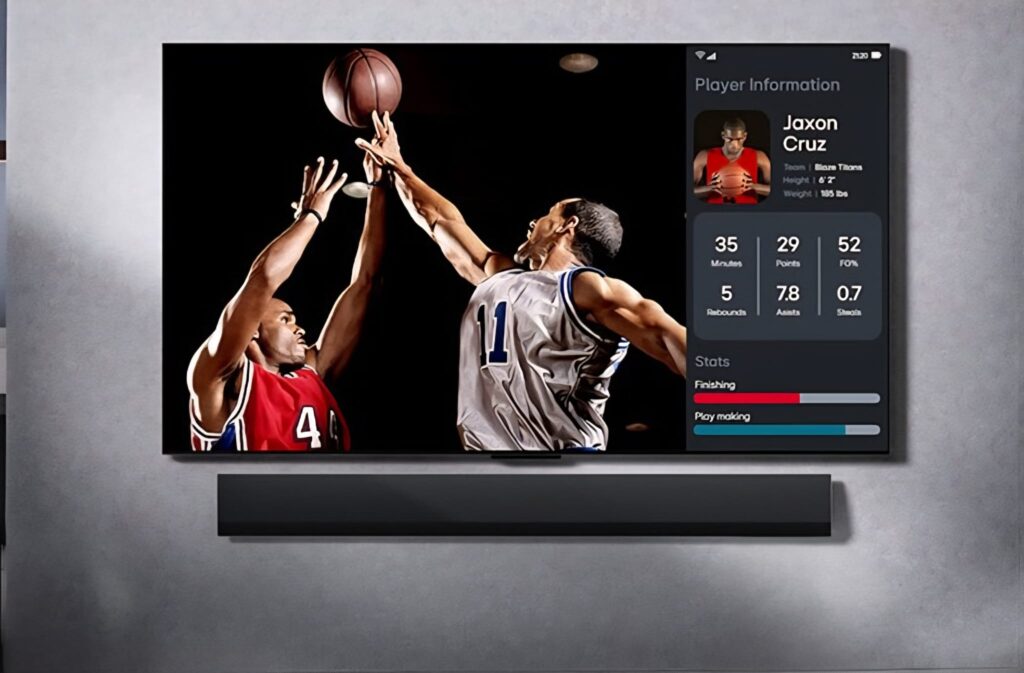
The competition in the OLED TV market is more intense than ever. Despite Samsung’s aggressive entry into the OLED market in 2022, LG maintained its leadership in 2023 with 3.18 million OLED TVs sold, capturing 52.4% of the global OLED market, a slight change compared to 2023. The result is that for 12 consecutive years, LG has dominated the global OLED TV market.
When analyzing the market for OLED screens sized 75 inches and above, which accounts for about 16% of the entire OLED TV market, LG also leads here with a 57.5% market share.
C5
The C5 is the updated mid-range model in LG’s OLED TV lineup. It replaces last year’s C4 model, which was also reviewed here.
Since the C series is LG’s best-selling OLED TV line, I requested it again this year for review.
Considering that with other importers delivery and installation are typically scheduled on different dates, this represents a significant advantage in convenience and efficiency for the consumer.
Extended Warranty
From my experience, extending the warranty on OLED displays is not a luxury but a real necessity.
Temporary image retention may disappear after running the pixel refresh process available in the TV’s menu. However, since permanent burn-in can also occur on OLED panels, especially if you frequently watch channels with static logos, it is advisable to insure the screen with comprehensive warranty coverage.
Design
The C5 design is very similar to last year’s model and the one before it. The main design change is that the black plastic rear panel has been replaced with a rough concrete-style finish.
Just like the C4, the C5 uses the same central stand, made of brushed aluminum at the front with a plastic rear, and suitable for 48–65 inch TVs. Since I installed the unit wall-mounted, I did not test the stand’s stability.
One important detail: the power cable is permanently attached to the back of the TV (non-removable). If you plan to route the cable through the wall for a concealed installation, you will need to install a thick conduit capable of passing both the cable and the plug.
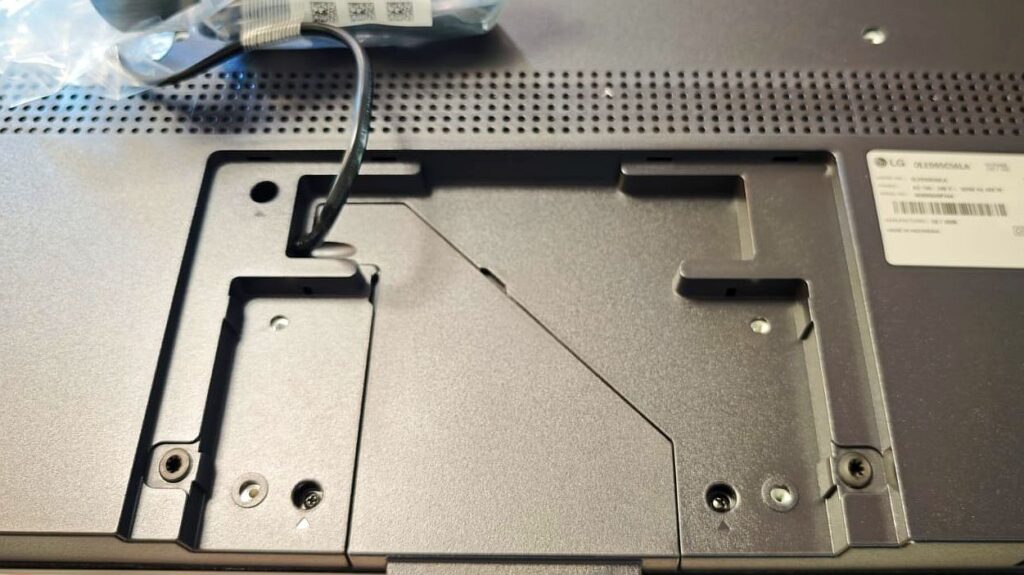
The back of the 65 inch TV has a VESA 200×300 mount. Without the stand, its dimensions are 145 × 83 cm.
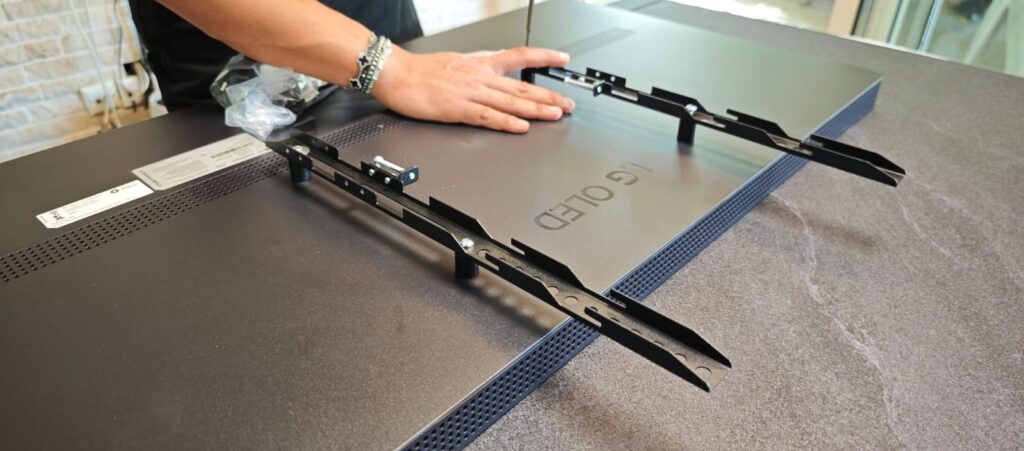
The gap between the picture edge and the frame is about 7 mm on the sides and 5 mm on the top and bottom, similar to the C4.
Flush wall installation
Specifications
- Resolution: 4K (3,840 × 2,160) at 120Hz
- Panel: OLED (Organic Light-Emitting Diode) with Brightness Booster
- HDR: Dolby Vision, HDR10 Pro, HLG – unchanged from the C3
- Supported decoding: Dolby Atmos, Dolby Vision, HDR10 Pro
- Gaming: Supports G-SYNC, FreeSync, and VRR to prevent image tearing during fast motion
- Speakers: 40W, 2.2 channels with downward-firing drivers
- AI audio: Upgraded to Virtual 11.1.2 Up-mix, compared with Virtual 9.1.2 on the C4
- Refresh rate: 120Hz normally, 144Hz when connected to a PC or console
- Color depth: DCI-P3 / 10-Bit
- Processor: α9 Gen8 AI Processor 4K
- Streaming: Built-in AirPlay 2 support
- Voice assistant: The C5 supports Alexa. LG discontinues Google Assistant support across its TVs.
LG has not issued an official explanation for discontinuing Google Assistant support.
TV connections
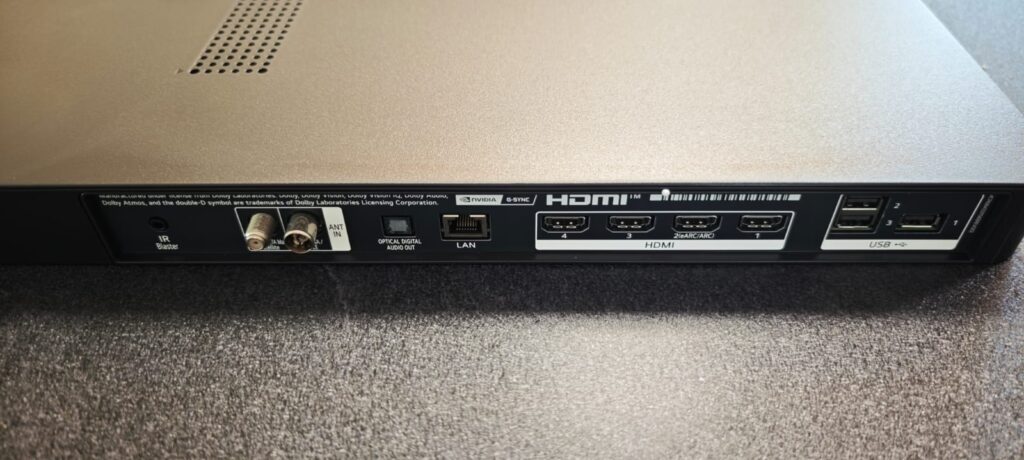
The C5’s connections are identical to those found in previous generations, all the way back to the C2.
- 4 HDMI ports (HDMI 2.1) supporting 48Gbps bandwidth, 4K at 120Hz, and 4:4:4 chroma, excellent specs for gamers
- All support Auto Low Latency Mode (ALLM), VRR, NVIDIA G-SYNC, and AMD FreeSync
- Only HDMI port 2 supports eARC
- 3 USB ports
- RF antenna input for the built-in DVB-T2 tuner
- Satellite dish input
- Ethernet port (speed not specified in the product specifications)
- Optical audio output
- IR Blaster for controlling devices such as a Harmony Hub
Wireless Connectivity
The C5 supports Wi-Fi 6E, rather than Wi-Fi 5 found in previous models. In addition, its Bluetooth 5.3 support allows compatibility with a wide range of modern wireless devices.
Interface and Settings
Year after year, LG makes the initial setup interface in webOS simpler and more user-friendly. However, it still requires approval of numerous consent agreements, including privacy policies, data sharing, advertising display, sponsored content, microphone data collection from the remote, and even biometric data.
After updating the system software, the TV again asks the user to re-approve all these settings.
Advertisements across multiple platforms
To complete the setup and enable advanced features such as voice control and AI picture, users must agree to all consent forms.
Despite this, LG allows users through a submenu to disable content recommendations completely, although data collection still continues, including biometric data this year. You will now also be required to share biometric data
Interface and Operation
The C5 runs webOS 2025, and it is clear that LG is attempting to move closer to the Google TV interface, both visually and in the way apps and content are arranged.
However, the time it takes for the system to load the full settings menu is noticeable.
In my case, it took about 10 seconds from pressing the button until the menu appeared, which slightly detracts from the overall user experience.
Visually and in terms of navigation, the interface is relatively convenient and accessible, offering a variety of local apps preinstalled from the start.
However, almost all of them require immediate updates before first use, sometimes preventing them from opening at all until the update is completed. This contrasts with other platforms, such as Samsung, TCL, or Sony, where apps are ready to use immediately.
LG also continues to integrate “topic cards.” For example:
- A Music card provides direct access to Spotify and YouTube Music
- A Sports card displays game scores (though it does not support Israeli leagues)
- The integration of Google Chromecast allows direct casting from a phone to the TV—a welcome addition.
It is important to note that neither the home screen nor the remote includes a traditional “Source” input menu. Instead, the TV redirects users to LG’s Home Hub, which aggregates all devices and inputs.
For the average user, especially those accustomed to a clear source button or plug icon, this may feel less intuitive.
Accessibility
During the initial setup stages, the C5 features a female voice narrator reading the menu options in local language.
However, the narration is delivered too quickly, which may make it difficult for older users to follow the instructions.
To LG’s credit, it enables users removing advertisements from the home screen via the settings menu, preventing exposure to services you have not subscribed to.
Artificial Intelligence (AI)
This year LG markets the C5 as a smart TV with artificial intelligence functions such as AI Sound Pro.
However, I found that the AI sound profile sounded compressed and somewhat artificial, and therefore preferred the Cinema sound mode, which provided a far more balanced and natural audio experience.
Unlike the C4, the C5 does not allow users choosing between preferred picture styles during the setup process. Instead, under the general settings menu, users can activate AI Picture Pro. According to LG, this function uses deep learning to improve image sharpness and realism depending on the content being displayed.
However, it is important to note that this feature does not work with certain copyright-protected content, such as some streaming services or encoded video files.

DVB-T2 broadcast Reception
The C5 supports over-the-air broadcasts reliably and without interruptions, with a clear program guide that also allows scheduled recording, as long as a USB flash drive is connected to the USB port on the back of the TV.
The remote control includes a dedicated button for TV broadcasts, but instead of showing the usual TV icon, it appears at the bottom of the remote alongside streaming app buttons under the non-intuitive name “LG Channels.”
Additionally, when switching between channels, only the channel name and number are displayed. The familiar progress bar showing how much time remains in the current program, which exists in competing TVs from Samsung and Sony, is missing here.
Remote Control
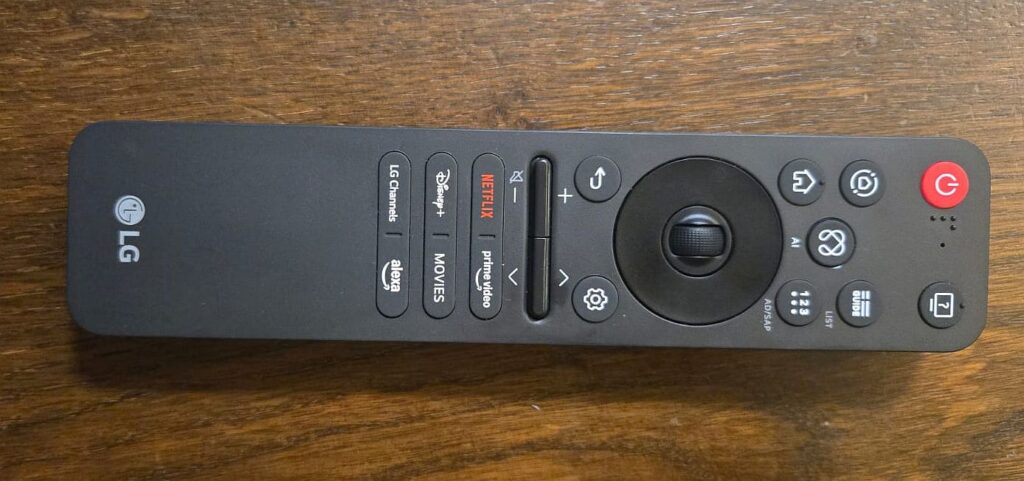
With the C5 launch, LG made a significant update to the C series remote control.
Instead of the large traditional remote, the C5 now comes with a compact remote similar in size and style to Sony and Samsung.
For example, instead of two separate volume buttons, there is now one rocker button that increases or decreases the volume depending on where it is pressed. The same applies to the channel selector.
However, you need to get used to the fact that there is no dedicated mute button. Instead, you must hold the volume-down button for about two seconds to fully mute the sound.
The app buttons at the bottom include a shortcuts to Alexa and “Movies”, which displays content from multiple applications, even services not subscribed to, including ads and paid content.
As with previous LG remotes, this remote does not have backlighting, which makes it harder to use in dark environments.
Finally, the input source menu is not accessible via a direct button, but only through the LG Home Hub.
You can display the list of recent sources by pressing the Back arrow from the home screen, but they are not displayed clearly or individually.
Additionally, the Source button that existed on previous LG remotes, which included a plug icon, has been completely removed. Users must instead navigate through LG’s Home Hub that combines all devices and inputs.
This solution is less intuitive for the average user, especially for those accustomed to a clear Source button or plug symbol.
Sound experience
Remember the C4 doesn’t support lossless DTS audio formats such as DTS:X, TrueHD, or DTS-MA in 7.1 channels?
LG has taken this one step further with the C5, by completely removing DTS support altogether, while continuing to support common formats such as Dolby Digital and Dolby Atmos. DTS formats are popular at IMAX Enhanced format, introduced on Disney+.
As a result, any video file with a DTS audio track will play without sound, accompanied by an incompatibility message.
The audio amplification in the C5 remains similar to the C4: a 2.2-channel system with 40 watts of power, with downward-firing drivers. There are no upward-firing or side-firing speakers, so even when the TV detects Atmos content and displays the logo, the spatial effect is very limited, especially without a dedicated soundbar.
Cinema sound mode provides the most balanced and faithful audio experience, compared with the Standard mode, which sounded noticeably less balanced.
Voice Recognition and Camera
The TV’s always-listening microphone can be disabled via a physical switch located at the bottom of the screen. A TV camera, either LG or third-party can also be installed, however, I didn’t find significant use that justify leaving it permanently connected.
Pixel Performance
To demonstrate the absolute pixel-level control of the C5, and to show how the WRGB OLED panel incorporates a white sub-pixel, I used a handheld electronic microscope capable of magnifying up to 1,600×.
In 300× magnification, I used a 21:9 film with subtitles appearing within the 21:9 frame, demonstrating complete shut down the pixels outside the movie area. This can be challenging for Edge-LED TVs, whose backlighting originates from the edges of the panel and often struggles to fully darken unused areas.
The result clearly demonstrates that the C5 completely shuts off the pixels outside the 21:9 image, preserving perfect black levels.
The 1,600× magnification demonstrates the absolute black within a scene where specific pixels must instantly turn off. This enables also clear observation of the white sub-pixel, the complete dimming of individual pixels, and the speed with which they return to maximum brightness.
Picture Quality
If you’ve made it this far, you’ve reached the main course, and it is an excellent one.
The C5’s image is mesmerizing, largely thanks to its infinite contrast ratio and extremely wide color gamut. However, the biggest surprise came from the video processor, which is without a doubt the best video processor I have seen in any TV so far. Every piece of content I played from my home network via wired connection, using the TV’s built-in media player, including 4K Remux files with a video bitrate of around 40 MB/s, played smoothly and flawlessly.
LG’s panel continues to rely on WRGB OLED technology, meaning each pixel includes an additional white sub-pixel alongside the three primary colors. This approach compensates for the limited brightness of OLED panels, which lose intensity because white light must pass through color filters.
In the C5 LG has increased the brightness even further, and the TV now easily handles direct sunlight from a large living room window, typical of many homes.
The picture quality is simply wonderful, especially with 4K content. Even 1080p terrestrial broadcasts, appear sharp and detailed. 4K HDR content delivers excellent contrast, where very bright highlights appear alongside absolute blacks, creating impressive depth and dimensionality without visible artifacts.
Seeking through the movie was smooth, without pauses or buffering, and scenes with rapid horizontal or vertical motion remained fluid, without tearing or dropped frames. It was so noticeable that it genuinely left me impressed.
I opened the demonstration with the opening scene of La La Land, which challenges any video processor with its continuous movement of cars and people throughout the sequence. The C5 handled it effortlessly, while other TVs I reviewed this year struggled to maintain a perfectly smooth image without minor stuttering.
I then switched to the opening scene of Avatar, where the trees rush toward the viewer. Once again, the C5 handled the scene flawlessly.
Many of us with large living rooms requiring wide viewing angles will be pleased to know that the viewing angles are excellent. Unlike LED technology, OLED colors remain consistent even at sharp viewing angles.
Dark areas on the C5 panel behave almost like a mirror, reflecting light fixtures and windows. This effect almost completely disappears when the screen displays bright content, but remains visible in darker scenes.
In Expert mode, I barely needed to adjust the picture tone, as it was very well balanced. Still, after experimenting slightly with the settings, I changed the color temperature to a warmer tone.
Viewing Experience
I started with the opening scene of the film Warfare, which reminds us of the rapid emotional shift that exists in a combat unit, a moment of joy, switching fast to survival. This film delivers spectacular HDR scenes, thunderous gunfire with bass that shakes the room, and echoing explosions. Despite the fast action, the α9 Gen8 processor handled everything flawlessly.
I then switched to The Wolf of Wall Street, which perfectly illustrates the phrase “the wicked prosper.” The film features numerous colorful scenes highlighting the C5’s wide color range, details such as DiCaprio’s suit, and the natural way interior spaces are partially dimmed.
The C5 delivered a highly impressive result, maintaining sharp facial features despite the film’s relatively older production.
I completed the demonstration with Guy Ritchie’s The Covenant, filmed in extremely high quality, combining wild landscapes with fast battle scenes. Despite the beam of light which appears behind the actors, the contrast remains excellent.
Once again, the C5’s processor performed flawlessly, without smearing or visible loss of detail.
In summary, the LG C5 surpasses its predecessors, delivering natural and spectacular results across all the content tested.
Burn-In
Like all OLED displays, the C5 can experience burn-in over time. This issue was more common in earlier OLED generations, however LG has improved its technology over the years, making burn-in far less common today.
To reduce the risk, LG includes several preventive tools in the settings menu, such as Pixel refresh, Screen shift by one pixel and automatic brightness adjustments.
Additionally, it is recommended to extend the warranty, ensuring coverage in case of burn-in.
Final Verdict
Let’s put it plainly.
When it comes to picture quality, video processing, design, and operating system, the C5 surpasses previous models.
Year after year, LG proves that an OLED TV can perform even in bright, sun-lit environments.
That said, it is not perfect.
Its AI sound mode is not ideal, DTS support has been removed, and to enjoy all of its smart features you must agree to extensive privacy permissions.
Still, these are relatively minor drawbacks. Most films today are distributed in Dolby formats, and to truly enjoy high-quality audio it is advisable to pair the TV with a soundbar.
The C5 is undoubtedly well suited for bright living rooms, for viewers who value excellent picture quality, deep blacks, and mesmerizing HDR performance.
Its thin design is elegant, and if placed on a media console, the concrete-style rear panel gives it a premium appearance.
Therefore, if you are hesitating and looking for a no-compromise OLED TV, the LG C5 is a stronger candidate than ever.