
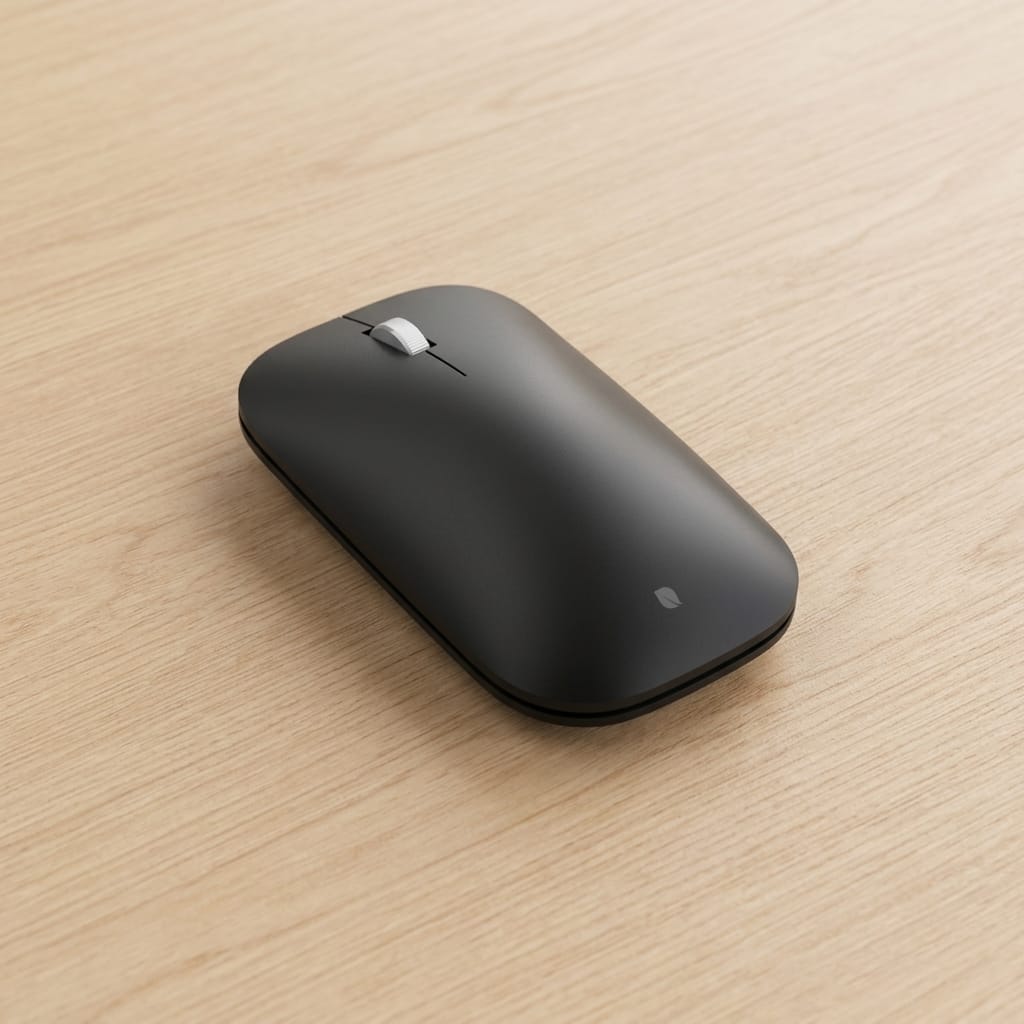
This Incase Modern Mobile Mouse review examines the original Microsoft-designed Bluetooth mouse, now sold under the Incase brand. Built around portability rather than feature overload, it promises a lightweight, minimalist experience for everyday productivity. Here’s how it performs in real-world use.
Compact wireless mice continue to have a place in today’s market, even as manufacturers compete to add more buttons, higher DPI sensors, and increasingly sophisticated software. Most people are not editing 8K video, designing CAD models, or playing competitive shooters. They simply need a mouse that connects instantly, travels easily, feels comfortable during a workday, and gets out of the way.
That philosophy has always defined Microsoft’s Modern Mobile Mouse. Rather than chasing specifications, it focused on simplicity. Slim enough to slip into a laptop sleeve, light enough to disappear inside a backpack, and uncomplicated enough to start working within seconds, it became a popular companion for students, business travelers, and anyone who valued portability over customization.
Today, that familiar design continues under a different name. Following Microsoft’s decision to exit the PC accessories business, Incase licensed the company’s accessory portfolio and now manufactures many of the same products, including the Modern Mobile Mouse. Although the branding has changed, the design language remains unmistakably Microsoft’s.
The question is whether that minimalist approach still holds up in 2026. With competitors like Logitech offering multi-device pairing, silent switches, rechargeable batteries, and extensive customization at similar prices, can a straightforward Bluetooth mouse still justify its place?
After spending several weeks using the Incase Modern Mobile Mouse as my daily companion, both at my desk and on the move, I came away with a clearer picture of where it excels and where its age begins to show.
Microsoft’s Design Lives On Under Incase
Seeing the Incase logo on a mouse that looks unmistakably like a Microsoft product can be a little confusing at first. The explanation is surprisingly straightforward. As published in PCMag, Microsoft exited the PC accessories business in 2024, including keyboards, webcams, and mice. Rather than discontinuing those products entirely, the company licensed their designs to Incase, allowing production to continue with the same industrial designs and engineering philosophy.
In other words, the Modern Mobile Mouse isn’t a redesign. It’s the same Microsoft hardware under a different brand name, preserving the original dimensions, industrial design, and overall user experience. If you’ve used Microsoft’s compact Bluetooth mice before, you’ll feel right at home here.
Design: Simplicity Above Everything Else
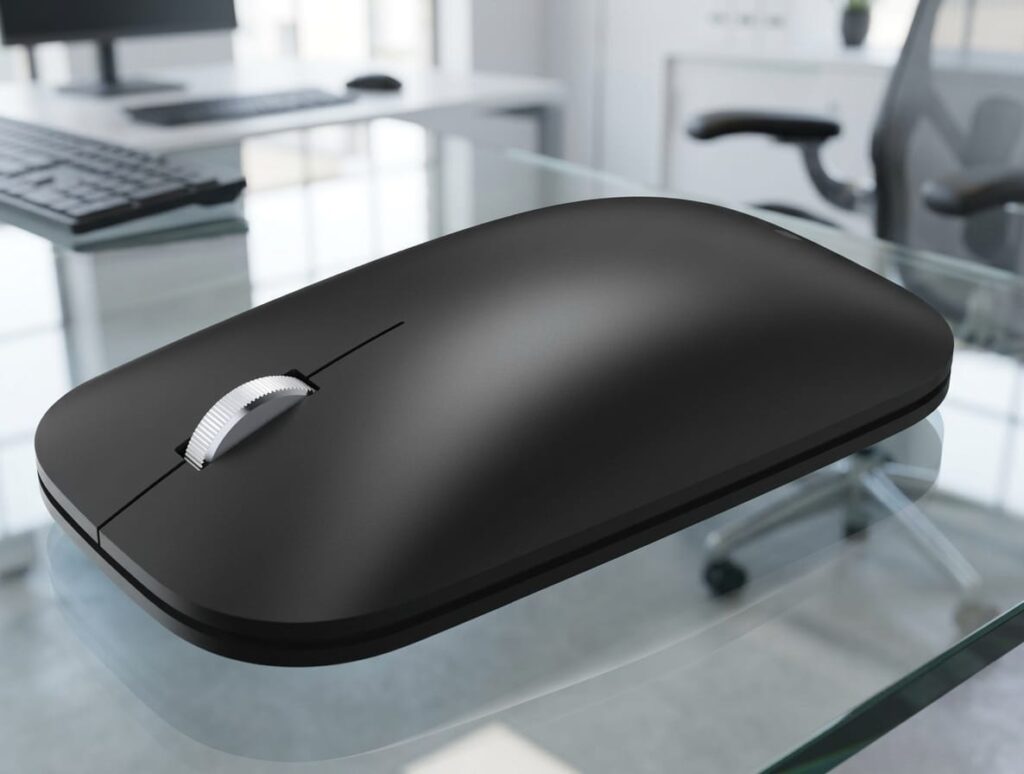
The first thing you’ll notice about the Incase Modern Mobile Mouse is just how understated it is. While many wireless mice have become increasingly sculpted, aggressive, or oversized, this one embraces restraint. Its low-profile silhouette, gently curved top shell, and clean lines give it a modern appearance that blends naturally into almost any workspace. There are no RGB lights, textured grips, or decorative accents competing for attention. It looks exactly like what it is: a productivity tool.
Its compact dimensions also make it one of the easiest mice to carry. Sliding it into a laptop sleeve or a backpack’s accessory pocket takes almost no effort, and unlike larger ergonomic mice, it never feels like it’s occupying unnecessary space.
Build quality is another pleasant surprise. The combination of high-quality ABS plastic with aluminum accents gives the mouse a sturdier feel than its minimalist appearance initially suggests. It remains lightweight, yet avoids the hollow sensation often associated with inexpensive Bluetooth mice.
One detail I particularly appreciated is its completely symmetrical shape. Because there are no sculpted thumb rests or side-specific contours, the mouse works equally well for both right- and left-handed users. As someone who is left-handed but frequently ends up using right-handed peripherals, I found this neutrality particularly welcome. It makes the Modern Mobile Mouse an easy recommendation for shared workspaces or households where multiple people may use the same device.
Its slim profile, however, also defines its biggest ergonomic compromise. Unlike full-sized productivity mice that support your entire palm, the Modern Mobile Mouse naturally encourages a fingertip or relaxed claw grip. Users accustomed to larger ergonomic designs may initially find it less supportive during extended sessions. On the other hand, the lower profile allows the hand to glide more freely across the desk, making quick navigation feel effortless. For shorter work sessions, commuting, or working from cafés and meeting rooms, that trade-off actually works in its favor.
Ultimately, the design isn’t trying to impress through complexity. It succeeds by staying out of your way.

Connectivity and BlueTrack Technology: Simple, Reliable, and Purposeful
The Incase Modern Mobile Mouse follows a very straightforward approach when it comes to connectivity. There is no USB receiver, no proprietary wireless adapter, and no complicated setup process. Instead, it relies entirely on Bluetooth connectivity, making it especially suitable for modern laptops that often have fewer available ports.
The mouse supports Bluetooth 4.0 and above, allowing it to connect directly to computers and tablets without requiring an additional dongle. Pairing is simple: pressing and holding the Bluetooth button for a few seconds places the mouse into pairing mode, after which it can be connected through the device’s operating system settings.
Compatibility is broad. During testing, it worked smoothly with Windows laptops, macOS devices, and iPadOS tablets. This flexibility makes it a practical option for users who move between different platforms, although there are some limitations worth mentioning.
Unlike many newer competitors, the Modern Mobile Mouse does not support multi-device switching. There is no dedicated button that allows you to instantly move between a laptop, desktop computer, and tablet. If you regularly work with multiple devices, you will need to disconnect and reconnect manually through the operating system.
For some users, this will feel outdated. Products such as Logitech’s Pebble series and other modern productivity mice have made device switching a standard convenience feature. However, there is another way to look at it. By focusing on a single Bluetooth connection, Microsoft kept the mouse extremely simple. For someone who uses one primary computer most of the time, the lack of extra connectivity features is unlikely to be a problem. The real question is whether your workflow benefits from flexibility or simplicity.
BlueTrack Sensor: Still One of Microsoft’s Smartest Ideas
One of the technologies inherited from Microsoft’s original design is BlueTrack, the company’s optical tracking technology developed to improve performance across a wider variety of surfaces. Unlike many inexpensive optical mice that struggle outside of a traditional mouse pad, BlueTrack sensors are designed to work reliably on surfaces such as wood desks, fabric, and other less-than-perfect environments. That makes it particularly useful for a portable mouse, where users often find themselves working from coffee tables, airport lounges, hotel rooms, or conference rooms rather than a dedicated desk.
In everyday use, the sensor performed exactly as expected. Cursor movement felt smooth and predictable across a variety of surfaces, including several where inexpensive Bluetooth mice typically begin to lose accuracy. Navigating documents, browsing the web, managing spreadsheets, and switching between applications all felt natural.
However, expectations need to remain realistic. The Modern Mobile Mouse is not designed for professional creative work that requires extremely high precision, nor is it intended for gaming. Microsoft does not officially advertise a DPI rating for this model, which is another indication that the focus is not on performance numbers but rather on consistent everyday usability.
For photo editors, designers, and gamers who rely on precise sensitivity adjustments, customizable DPI settings, or specialized software, this mouse will feel limited. For office work and general computing, however, the tracking performance is more than sufficient.
Controls: A Return to the Basics
The Modern Mobile Mouse keeps its control layout deliberately minimal. You get the standard left and right buttons, along with a clickable scroll wheel. There are no side buttons, no gesture controls, no customizable shortcuts, and no companion software for adjusting functions.
Compared with today’s feature-heavy mice, this may initially seem like a disadvantage. Many competitors now offer additional buttons that can be programmed for browser navigation, productivity shortcuts, or creative applications.
But simplicity is clearly part of the design philosophy here. There is no software to install, no profiles to configure, and no settings to manage. You simply connect the mouse and start working. It’s the kind of mouse you pair once, then almost forget exists, which is exactly what many productivity users want.
The scroll wheel itself performs well. It offers smooth vertical scrolling with a quiet, controlled feel that works particularly well for reading documents, browsing websites, and navigating long spreadsheets.
During daily use, I never felt that the mouse was missing features because of poor design. Instead, the limitations became noticeable only when comparing it directly with more advanced competitors. This distinction matters, since the Modern Mobile Mouse is not missing features accidentally. It is intentionally focused on users who do not need them.
Battery Life: The Advantage of Simplicity
Some buyers may initially see replaceable batteries as outdated. In practice, however, they eliminate charging downtime entirely. When the batteries eventually run out, replacing them takes less than a minute, allowing you to continue working immediately.
The Incase Modern Mobile Mouse runs on two AAA batteries, which are included in the package. In an era where many devices are moving toward built-in rechargeable batteries, using replaceable batteries might seem like a step backward. However, for a portable productivity accessory, there are practical advantages.
Microsoft rates the battery life at up to one year of normal usage, depending on usage patterns. During my testing, the mouse consistently behaved like a device designed for low maintenance. There was no charging cable to remember, no battery indicator anxiety, and no need to interrupt work because the mouse needed power. For people who frequently travel, this approach has a certain appeal. Carrying a spare pair of AAA batteries is simple, and replacing them takes seconds.
The downside is equally obvious. Rechargeable users may prefer the convenience of simply connecting a USB-C cable when power runs low. The Modern Mobile Mouse requires physically replacing batteries when they eventually run out. Ultimately, it comes down to personal preference. Some users value rechargeable convenience. Others prefer the freedom of a mouse that can operate for months without thinking about it.
Real-World Experience: Living With the Incase Modern Mobile Mouse
Specifications only tell part of the story with a mouse. The real test is whether it becomes something you stop thinking about during the workday. A good productivity mouse should not demand attention. It should connect quickly, move accurately, feel comfortable enough, and simply disappear into the workflow. That is exactly where the Incase Modern Mobile Mouse makes a strong impression.
During everyday use, I found it to be a lightweight and predictable companion for standard tasks. Opening documents, navigating websites, moving between applications, and managing emails all felt smooth and natural. There was no learning curve, no software configuration, and no need to adjust settings before getting productive.
Ironically, that simplicity ends up being one of its biggest strengths. Modern computer accessories often compete by adding more features. More buttons, more customization, more profiles, more software. While those options are valuable for certain users, they can also introduce unnecessary complexity for people who simply want a reliable tool.
The Modern Mobile Mouse takes the opposite approach. It is designed to work quietly in the background. That said, extended use reveals the limitations of its compact design.
During shorter sessions, the low-profile shape feels comfortable and natural. However, users who spend eight or more hours every day working with a mouse may prefer a larger ergonomic model that provides more palm support. The slim shape is excellent for portability, but portability and maximum comfort are not always the same thing.
This is not a flaw as much as a reminder of the product’s intended purpose. The Modern Mobile Mouse is designed for mobility, not as a dedicated workstation mouse. For students, business travelers, hybrid workers, and anyone who regularly moves between locations, that compromise makes sense. For a permanent office setup where comfort over long hours is the highest priority, a larger ergonomic mouse would likely be a better choice.
Incase Modern Mobile Mouse vs Logitech Pebble 2: Which One Makes More Sense?
The compact wireless mouse market is crowded, and the biggest competition for the Incase Modern Mobile Mouse comes from Logitech. The Logitech Pebble 2 M350s is one of the most popular alternatives in this category. It offers a similar minimalist design philosophy, compact dimensions, Bluetooth connectivity, and a focus on portability.
However, the two products approach the category slightly differently. The Logitech Pebble 2 has some advantages. It supports connection to multiple devices, includes quieter clicking technology, and works with Logitech’s customization software. For users who regularly switch between a laptop, tablet, and desktop computer, these features can make a noticeable difference.
The Incase Modern Mobile Mouse, on the other hand, feels more like a traditional Microsoft accessory. Its strengths are simplicity, solid construction, and the familiar BlueTrack tracking technology. It does not try to become a productivity command center. It simply works. The choice largely depends on your priorities. In practice, the Pebble 2 is the better choice for users who regularly switch between multiple devices, while the Modern Mobile Mouse is better suited to those who value simplicity and portability above everything else.
If you want:
- Multiple device switching
- Customizable buttons
- More modern software features
The Logitech option is likely the better fit.
If you want:
- A simple Bluetooth mouse
- Reliable everyday tracking
- A design originally created by Microsoft
- Minimal setup and maintenance
The Incase Modern Mobile Mouse remains a compelling choice.
Incase Modern Mobile Mouse vs Cheap Bluetooth Mice: Is Paying More Worth It?
The other challenge facing the Modern Mobile Mouse is not only premium competitors, but also the huge number of inexpensive Bluetooth mice available online. A quick search on marketplaces such as Amazon and AliExpress reveals countless wireless mice selling for significantly less. Many of these models promise similar features: Bluetooth connectivity, compact design, silent buttons, and long battery life.
For some users, those cheaper options are perfectly reasonable. If you need a mouse for occasional travel, a secondary computer, or basic home use, spending more on a branded model may not provide a dramatic difference. A budget Bluetooth mouse can still move a cursor and complete everyday tasks.
The biggest differences usually don’t show up on day one, they appear after months of daily use. Lower-cost mice often vary more in build quality, button consistency, wireless stability, and long-term reliability. Some use generic sensors that perform well on ideal surfaces but struggle in less predictable environments. Others may feel lightweight in a way that crosses the line from portable to inexpensive.
The Incase Modern Mobile Mouse costs more because it offers a more predictable experience. The Microsoft-designed hardware, BlueTrack sensor, consistent construction, and simple operation create a product that feels refined rather than merely functional.
However, the price difference is not automatically justified for everyone. Someone buying a mouse for occasional use may be perfectly happy with a cheaper alternative. But for a person who uses a laptop every day, travels frequently, or values accessories that simply work without surprises, paying extra for a recognized design can make sense.
The important point is understanding what you are buying. You are not paying for dozens of features. You are paying for simplicity, consistency, and a more polished everyday experience.
Who Should Buy the Incase Modern Mobile Mouse?
The Incase Modern Mobile Mouse is best suited for users who value portability and simplicity over advanced customization. It is a good choice for:
- Laptop users who need a compact travel mouse.
- Students who move between classrooms, libraries, and home.
- Hybrid workers who regularly change work locations.
- Users who prefer a clean minimalist desk setup.
- People who want a reliable mouse without installing additional software.
- Left-handed users looking for a truly symmetrical design.
Its strongest advantage is that it understands its purpose. It is not trying to replace every mouse on the market. It is designed for people who want a lightweight, dependable companion that can move wherever they work.
Who Should Skip the Incase Modern Mobile Mouse?
Despite its strengths, this mouse is not the ideal choice for everyone. Users who spend long hours every day at a fixed desk may prefer a larger ergonomic mouse with better palm support. The compact design that makes it excellent for travel can become less comfortable during marathon work sessions.
It is also not suitable for gamers, graphic designers, or professionals who need advanced precision controls. The lack of adjustable DPI, extra buttons, and customization software limits its usefulness for specialized workflows.
Finally, users who frequently switch between multiple devices may find the lack of multi-device pairing frustrating. Modern alternatives have made this feature increasingly common, and the Incase model feels behind in this area.
Final Verdict: A Simple Mouse That Knows Exactly What It Is
The Incase Modern Mobile Mouse is a product built around restraint. At a time when many computer accessories compete by adding more features, more buttons, and more customization options, this mouse takes a completely different approach. It focuses on the basics: portability, reliability, and a clean user experience.
That simplicity is both its biggest strength and its biggest limitation. During my time using it, the Modern Mobile Mouse proved to be a dependable everyday companion. The Bluetooth connection was stable, the BlueTrack sensor performed well across different surfaces, the compact design made it easy to carry, and the overall experience felt polished. The best compliment I can give it is that I often forgot I was testing it at all. It simply became part of my workflow, which is exactly what a good productivity mouse should do.
However, it is important to understand what this mouse is not. It is not a professional productivity mouse designed for people who spend their entire day performing demanding creative work. It is not a gaming mouse, it does not offer advanced customization, and it does not compete with modern multi-device mice that are built around complex workflows.
Instead, it is aimed at a much larger group of users who simply want a lightweight Bluetooth mouse that works without unnecessary complications. The fact that the design originated from Microsoft gives it an additional appeal, especially for users who appreciated Microsoft’s hardware philosophy over the years. Incase has preserved the minimalist approach well, creating a product that feels familiar rather than experimental.
Would I choose it over every competing mouse? Not necessarily.
A Logitech Pebble 2 offers more flexibility for users who switch between devices. A larger ergonomic mouse will be more comfortable for long work sessions. And inexpensive Bluetooth mice can be good enough for people who only need basic functionality.
But for users who value portability, clean design, reliable performance, and a mouse that can simply be thrown into a laptop bag and forgotten until needed, the Incase Modern Mobile Mouse remains a strong option.
It doesn’t stand out because it offers more features. It stands out because it knows exactly which features it doesn’t need. It wins because it understands that sometimes the best tool is the one that gets out of your way.
Ventajas
✓ Compact and lightweight design
✓ Microsoft-designed hardware with proven ergonomics
✓ Stable Bluetooth connection
✓ BlueTrack sensor works well on many surfaces
✓ Symmetrical design suitable for left- and right-handed users
✓ Excellent portability for laptop users
✓ Long battery life with replaceable AAA batteries
✓ No software installation or complicated setup required
—
Desventajas
✗ No multi-device switching
✗ No customizable buttons
✗ Not ideal for long eight-hour work sessions
✗ No rechargeable battery
✗ Limited features compared with newer competitors
✗ Not suitable for gaming or professional creative work
Manufacturer: Incase (Microsoft-designed accessory)