
I have been using the Samsung Galaxy Watch 9 44mm Bluetooth as my primary smartwatch, and despite everything I am about to say, I want to make one thing very clear from the beginning: I really like this watch. In fact, I like it enough that it has become my main watch, the one I actually wear every day and rely on for notifications, workouts, health tracking, and all the little things a smartwatch is supposed to make easier.
That is also exactly why these issues bother me.
When you use a product occasionally, it is easy to overlook small annoyances, but when a watch becomes something you wear every day, those small frustrations start showing up again and again. None of the things I am going to mention makes the Galaxy Watch 9 a bad smartwatch, and I would still choose it as my everyday watch, but they are the things I keep thinking about and wishing Samsung would fix in a future software update or in the next generation.
In other words, this is not a list of reasons why I dislike the Galaxy Watch 9. It is almost the opposite: these are six things that keep an otherwise excellent watch from feeling perfect to me.
1. Charging is much more complicated than it should be
The first thing that really bothers me is charging, and I honestly did not expect this to become such an annoyance when I bought the Galaxy Watch 9.
I had the charging cable and charging puck from my previous Galaxy Watch 8, so naturally I assumed I would be able to continue using it with the new watch. Instead, I discovered that the Watch 8 charger does not simply fail to charge the Watch 9 in my experience; when I tried using it, the battery percentage actually went down rather than up, which is about the last thing you want to see when you put your watch on a charger.
That means I have to use the charger designed for the Watch 9 rather than reusing the charger I already had, which feels unnecessarily wasteful and inconvenient, especially for someone who upgrades within the same product family.
The situation becomes even more frustrating when I use a multi-device charging setup, because I have found that the Watch 9 does not reliably charge for me when connected to certain combined charging solutions, meaning that I have to go back to using Samsung’s dedicated charger by itself.
And then there is the charging speed itself.
Going from completely empty to around 90 percent can take roughly two hours for me, which feels like a very long time for a smartwatch that I wear throughout the day and also use for exercise.
I understand that battery capacity, charging temperature, battery protection and other factors can affect charging times, but from a user’s perspective, the problem is very simple: if I want to use the watch for a workout, especially after a long day when the battery is low, I cannot just put it on the charger for a few minutes and expect a meaningful amount of battery to come back quickly.
For a watch that is otherwise so convenient, charging feels strangely inconvenient.
2. The swimming display needs a complete rethink
This is probably my biggest frustration with the Galaxy Watch 9, because I use the watch for pool swimming and I want the information on the screen to be immediately readable while I am actually in the pool.
When I am swimming, I want four important pieces of information displayed clearly and in large, easy-to-read numbers, because there is no point in giving me a beautiful collection of data if I cannot read it while I am moving through the water.
Unfortunately, that is not how the Galaxy Watch 9’s swimming display works for me.
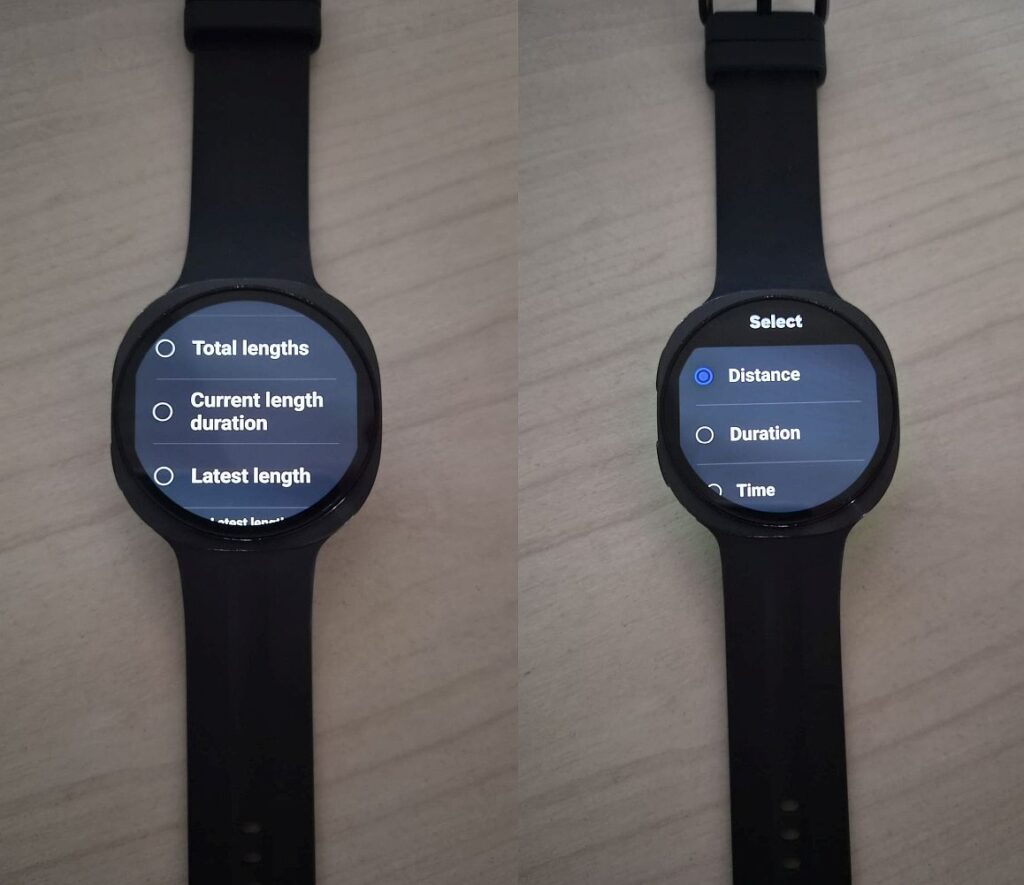
When I select multiple data fields, some of the information I consider most important, including the time and heart rate, can end up being displayed in a relatively small font. That might be perfectly acceptable when you are sitting on the couch looking at your watch, but it becomes a completely different story when you are swimming, moving your arms, dealing with reflections and water, and trying to glance at the display for a fraction of a second.
And if you are over 50 and normally need reading glasses during the day, as I do, the problem becomes even more obvious: small numbers on a smartwatch screen are not useful when you are swimming.
This is an area where I think Samsung could learn something from Garmin.
Garmin’s approach is much more straightforward: divide the screen into four clear areas, give each metric its own space, and make the information immediately understandable. You can glance at the watch and instantly see what each number represents without having to search around the display.
On the Galaxy Watch 9, I sometimes find myself looking at a screen where the information is positioned in different areas without a clear visual structure, while large parts of the screen remain unused.

There is also a terminology problem that makes things more confusing than they need to be.
For example, seeing terms such as “distance”, “total lengths” and “latest length” which does not immediately make it obvious what each one actually represents during a swimming workout. I found myself having to figure out what Samsung meant rather than simply looking at the screen and immediately understanding what I was seeing.
For a device that is supposed to be a real-time workout companion, that should not require interpretation.
I want Samsung to give swimmers a simple, customizable four-field screen with large numbers, clear labels and a logical layout.
That would make a huge difference.
3. The water lock is useful, but it gets in the way when you actually need the watch
I completely understand why Samsung uses water lock during swimming. You do not want water touching the screen and accidentally changing settings, pausing a workout or triggering something else while you are in the pool.
The problem is that Samsung seems to have designed the experience around the assumption that you can always interact with the touchscreen when you need to, and that simply isn’t true when you are swimming.
Before I even start swimming, my hands may already be wet, and that makes the initial swipe required to start the workout much harder than it should be.
Once the workout has started and water lock is enabled, the situation becomes even more frustrating.
Suppose I decide that I want to change the information displayed on the screen, perhaps switching from six data fields to four or three because I have realized that the original layout is too difficult to read. I cannot simply make that change while water lock is active.
Instead, I have to disable water lock, navigate through the screens using swipes, make the change, and then go through another series of steps to enable water lock again.
This is where the design starts working against the reality of swimming.
My hands are wet, the screen is wet, and swiping is precisely the kind of interaction that becomes unreliable under those conditions. Samsung already allows certain important functions to be controlled with physical buttons, so I would like to see much more of that philosophy applied to swimming.
If I want to pause or stop the workout, having a physical button available is extremely useful.
Why shouldn’t I also be able to move between workout screens, confirm an action, or control water lock using the physical buttons?
When my hands are dry, the touchscreen is perfectly easy to use, but swimming is one of those situations where a touchscreen should not be the only answer.
A swimming workout should be designed around wet hands, not around the assumption that the user’s fingers are perfectly dry.
4. The heart-rate tracking during swimming intervals can miss the moment that matters most
This one is particularly frustrating because I generally find the Galaxy Watch 9’s heart-rate tracking very good. The problem becomes much more noticeable during high-intensity swimming intervals.
When I am doing an interval and my heart rate rises quickly, I can physically feel that my heart rate has reached a high level, but the watch does not always seem to catch up immediately. Instead, the heart-rate reading can initially remain relatively low and then gradually climb as the watch recognizes that my heart rate has increased.
The problem is that during an interval workout, the moment I actually care about is the peak.
If my heart rate reaches its maximum toward the end of a hard interval, I want the watch to tell me what my heart rate is right then, not slowly arrive at that number after the hardest part of the effort has already passed.
By the time the watch finally catches up with what I am feeling, the interval may already be over. This is one of those situations where average accuracy is not enough.
If I am doing an easy swim and my heart rate is relatively stable, a small delay may not matter much. But during intervals, where the heart rate can rise quickly and the entire purpose of the workout is to push through specific intensity levels, responsiveness becomes just as important as accuracy.
Unfortunately, this problem also connects back to the display and control issues I mentioned earlier. When I am in the middle of an interval, I want the most important information to be immediately visible, and I want to be able to control the watch without fighting with a wet touchscreen.
5. Always-on display sounds great until you actually use it during exercise
I really like having an always-on display on a smartwatch, and I would love to keep the Galaxy Watch 9’s screen visible throughout the day.
The problem is battery life.
When I leave the display on continuously and also use the watch for sports, the battery can disappear far too quickly for my liking, to the point where keeping the display permanently on is simply not practical for a full day of use.
So I normally use the gesture-based option that turns the screen on when I raise or rotate my wrist. That sounds like a reasonable compromise, except that it does not always work the way I want it to.
There are times when I raise my wrist or rotate the watch to look at it and the screen simply stays black, forcing me to repeat the movement or physically touch the watch to wake it up.
It is a small thing, but it is exactly the kind of small thing that becomes surprisingly annoying when it happens repeatedly throughout the day.
A smartwatch should make checking the time effortless.
I don’t want to think about whether I rotated my wrist at the right angle or whether the sensor recognized the movement correctly; I just want to glance at my wrist and see the information I need.
I would love to see Samsung improve the balance between always-on display, battery consumption and wrist detection, because right now I feel like I have to choose between a feature I really like and battery life that I actually need.
I still really like the Galaxy Watch 9
After all of this, I don’t want anyone to come away thinking that I dislike the Galaxy Watch 9. Quite the opposite. I use it as my primary watch, and if I did not like it, I would simply wear something else. That is exactly why these issues bother me enough to write about them.
The Galaxy Watch 9 gets so many things right that the remaining problems become much more noticeable. When a product is mediocre, you expect compromises. When a product is very good, you start wondering why a few relatively simple things cannot be better.
For me, the biggest opportunity is swimming.
I would love to see Samsung rethink the entire swimming interface around the reality of being in a pool: large numbers, four clearly defined data fields, better terminology, a more logical use of the screen, physical-button controls for more actions, and a much smoother way of starting and controlling a workout when the user’s hands are wet.
I would also love faster and more flexible charging, better control over the always-on display without destroying battery life, and faster heart-rate response during high-intensity intervals.
None of these requests changes what I think about the Galaxy Watch 9 today.
I still really like this watch.
But if Samsung addressed these issues, especially the swimming experience, I would have a much harder time finding anything left to complain about.
And honestly, that is what I want from my next Galaxy Watch: not a completely different watch, but the same watch I already enjoy, with the frustrating little things finally fixed.